How to Choose a Zero Based Budgeting App: 6 Questions to Ask
Learning how to choose a budgeting app, whether you want a simple tracker or a zero based budgeting app that gives every dollar a job, is easier when you know what can go wrong, and the story of Pocketbook is a useful place to start. Pocketbook was a free budgeting app built for Australian households. Its promise was simple: connect your bank accounts, let the app sort your transactions into categories, and use that clearer picture to make better decisions. For a busy family, that could be much easier than keeping a spreadsheet by hand.
Here is the important part up front: Pocketbook no longer exists. Its app and web service closed on August 5, 2022, and it is not available to new or existing users anywhere. It was also never really a U.S. product; it was designed around Australian banks. So instead of a review of an app you cannot download, this guide explains what Pocketbook was, what happened to it, and how to pick a budgeting app today that is active, affordable, safe with your data, and easy to leave if you ever need to.
The short version: a budgeting app is a visibility tool, not a complete financial plan. It can show you where money went and remind you about upcoming bills. It cannot agree on priorities with your partner or make choices for you. Keep that in mind and you will choose a better tool, and use it better, too. If you are still figuring out how to start a budget, we also explain zero-based budgeting and what to look for in a zero based budgeting app.
What Happened to Pocketbook?
Pocketbook was founded in Sydney in 2012 by Bosco Tan and Alvin Singh as a free budget planner and personal finance app. In September 2016, the Australian buy-now-pay-later company Zip bought it, for about A$7.5 million according to Startup Daily. At the time of the closure, Zip said the app had more than 800,000 users.
In July 2022, Pocketbook announced that it would shut down on August 5, 2022. Users had until August 4 to export their categorized transactions as a CSV file, a plain spreadsheet format. After that, the company said it would delete users’ personal information and securely delete their financial and transaction data. Pocketbook’s own notice did not give a reason. News reports said Zip wanted to concentrate on its core business in Australia and New Zealand.
Was Pocketbook ever available in the U.S.?
Not in any practical sense. Pocketbook worked by connecting to Australian banks such as Westpac, Commonwealth Bank, ANZ, and NAB, and reviews always described it as an app for Australian accounts. A U.S. reader could not have linked an American checking account to it. Today the old Pocketbook web address shows unrelated content, so be wary of any download or website that claims to be Pocketbook.
Pocketbook is not the only budgeting app to close
Pocketbook’s closure was not unusual. In the U.S., Intuit shut down its popular free budgeting app Mint in March 2024 and pointed users toward Credit Karma, another Intuit service that did not offer the same budgeting features. Its users had to find a new tool and rebuild their categories. The lesson is the same in both countries: any app can change, be sold, or close, so choose one with that possibility in mind.
What Pocketbook Did Well (and What a Budgeting App Should Do)

Pocketbook’s central feature was account aggregation. In plain language, account aggregation means bringing information from several financial accounts into one view. A user could connect bank accounts and cards, then review spending without opening each bank app separately. Many budgeting apps work this way today, so its feature list is still a good checklist.
- Connected account viewing: balances and transactions from several accounts in one place. That helps couples, people with several cards, and anyone who loses track of which account pays which bill.
- Automatic categorization: transactions sorted into groups such as groceries, transportation, bills, and entertainment, so similar purchases can be totaled together.
- Budgets and spending limits: an expected amount for each category, compared with what you actually spent.
- Bill reminders: recurring payments highlighted so a subscription, utility bill, or annual charge does not sneak up on you.
- Spending analysis: summaries that show patterns over time, such as frequent takeout meals or unusually high gas costs.
Pocketbook’s approach was more about observation than control. A user could see that the household had spent $520 on groceries in a month, but the app could not stop another grocery trip. The user still had to decide whether the amount was reasonable and adjust next week’s shopping or move money from another category. Most budgeting apps work this way, and even a zero based budgeting app, which asks you to plan ahead, cannot make the decision for you. It informs; you decide.
Where automatic budgeting falls short
The categories were never perfect. A single big-box store receipt might include groceries, toiletries, and a birthday gift, yet show up as one grocery transaction. A transfer from savings to checking might be counted as spending if you did not mark it as a transfer. Automatic does not mean infallible. Checking and correcting a few transactions each week is part of using any budgeting app responsibly.
Data quality matters too. Bank connections can fail, transactions can arrive late, and duplicates can distort a total. An app that says $1,100 is available when a large card payment has not posted yet is not reassuring; it is misleading. Treat the dashboard as a helpful summary, not the final word on your bank balance.
What Is a Zero Based Budgeting App?
Zero-based budgeting is a simple idea: before the month starts, you give every dollar of expected income a job until your income minus your planned spending, saving, and debt payments equals $0. It does not mean your bank account hits zero. It means no money is left unassigned, so nothing drifts away without a decision. Savings, a small buffer, and fun money all count as jobs.
A zero based budgeting app is built around that method. Instead of only showing where money went, it asks you to plan where money will go, then helps you move dollars between categories when plans change. YNAB (You Need A Budget) and EveryDollar are two well-known examples of apps built around zero-based budgeting. Pocketbook mostly looked backward; a zero based budgeting app is designed to make you plan forward.
What to look for in a zero based budgeting app
- Manual or bank-linked: some apps have you enter transactions by hand, others import them from linked accounts, and many offer both. Manual entry shares less data; linking saves time.
- Categories that roll over: money left in a category such as car repairs or gifts should carry into next month instead of disappearing.
- Privacy: check how the app connects to your bank and what it does with your data, using the checklist below.
- Cost and free trials: many apps of this type charge a subscription after a free trial. Note the renewal date before you start.
Features and prices change often, so check each app’s current details before you sign up.
How to Choose a Budgeting App: 6 Questions to Ask
When you are deciding how to choose a budgeting app, these six questions cover what matters most. They mirror the lessons from Pocketbook and from other apps that have closed. Use the infographic as a quick checklist, then read the notes below.
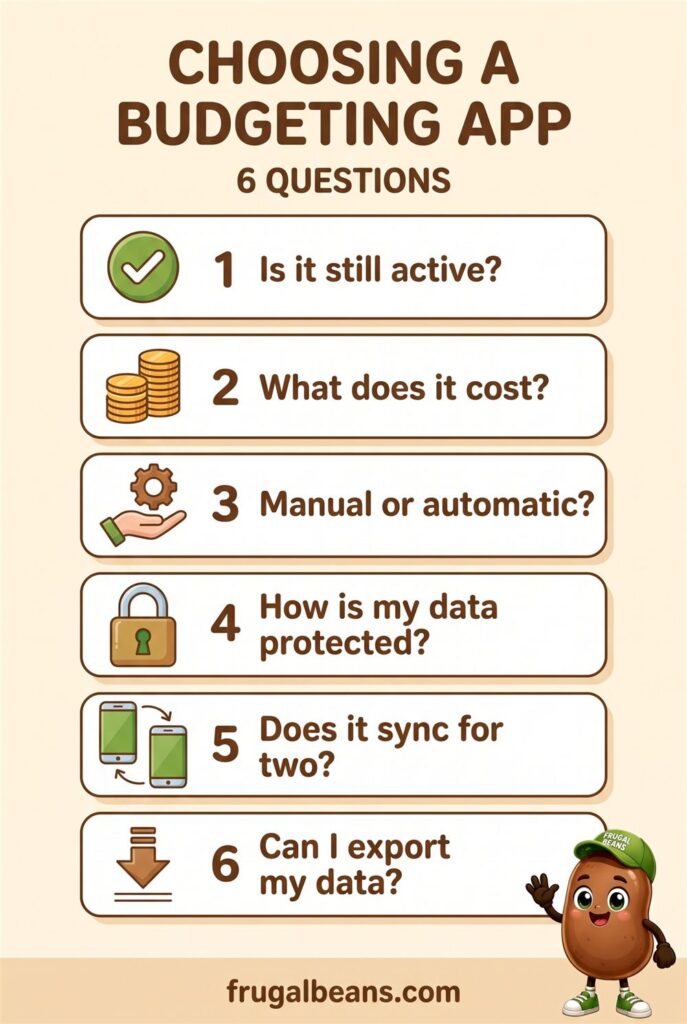
1. Is it still active?
This sounds obvious, but old review articles stay online for years after an app closes. Before you sign up, check that the app has been updated recently in your phone’s app store, that the company’s website is current, and that it supports U.S. banks if it connects to accounts. A budgeting app that has not been updated in a long time may be on its way out.
2. What does it cost?
Budgeting apps come in a few pricing styles: free with ads or upsells, a monthly or yearly subscription, or a one-time purchase. Free is not automatically cheaper. Pocketbook was free, and free services still need a way to make money, whether through advertising, selling other financial products, or eventually charging a fee. A paid subscription is not automatically better, either. Compare the yearly cost with what you expect to save, and watch for free trials that renew automatically.
3. Manual or automatic?
Automatic apps import transactions from linked accounts. They save time but need access to your financial data. Manual apps ask you to type in each purchase. That takes more effort, but many people find the act of entering a purchase makes them think twice about it, and no bank connection is required. Neither style is right for everyone; pick the one you will actually keep using.
4. How is my data protected?
This is the question most people skip. Read how the app connects to your bank, what it stores, whether it shares or sells data, and how to delete your account. We cover this in detail in the privacy section below.
5. Does it sync for two?
If you share finances with a partner or roommate, check whether two people can use the same budget on different phones, and whether changes sync quickly. A budget only one person can see tends to become one person’s job and the other person’s surprise.
6. Can I export my data?
Pocketbook users had a short window to download a CSV file before their data was deleted. Choose a budgeting app that lets you export your transactions and categories at any time, and do it every few months. Your budget history should belong to you, not to the app.
Budgeting App Privacy: Connecting Your Bank Accounts Safely

Connecting a budgeting app to a bank account requires careful thought. Even when an app uses strong security, you are still placing sensitive financial information with another company. Before linking anything, understand what information is collected, how access works, whether your login details are stored, and how to revoke access.
How budgeting apps connect to your bank
Pocketbook used a method called screen scraping, which typically required users to hand over their online banking password so the service could log in on their behalf. Many apps now connect through the bank’s own sign-in page or through a data-sharing service, so the app never sees your password. When you link an account, notice which screen asks for your password. If it is the app rather than your bank, think carefully before continuing.
The rules around this are still developing in the U.S. The Consumer Financial Protection Bureau’s page on personal financial data rights explains its rule on how banks must share your data with you and with apps you authorize, and notes that the agency has been reconsidering parts of that rule, including data security and privacy.
A simple privacy checklist
- Read the privacy policy’s sections on data sharing, selling, and deletion before you link an account.
- Link only the accounts you need for budgeting. A checking account and one credit card may be enough.
- Turn on two-step verification for both the app and your bank.
- Use a unique password for the budgeting app that you do not use anywhere else.
- Check your bank’s settings for a list of connected apps, and remove any you no longer use.
- Download only from your phone’s official app store, and double-check the developer name.
- When you stop using an app, delete your account inside the app rather than just removing it from your phone.
If you ever suspect your banking login has been misused, contact your bank right away. The FTC’s IdentityTheft.gov lets you report identity theft and get a personal recovery plan.
Paper, Spreadsheet, or Budgeting App?

Part of knowing how to choose a budgeting app is knowing when you do not need one. Pocketbook’s closure reminds us that the method matters more than the tool. Each option has real strengths.
|
Method |
Good for |
Watch out for |
|
Paper notebook |
People who think best with a pen; no data sharing at all |
Easy to skip a week; no automatic totals |
|
Spreadsheet |
Full control, free, easy to move anywhere |
Takes setup time; manual entry |
|
Your bank’s built-in tools |
Spending summaries with no extra app or data sharing |
Usually covers only that bank’s accounts |
|
Manual budgeting app |
Mindful tracking on your phone without linking accounts |
You must enter every purchase |
|
Automatic budgeting app |
Seeing several accounts in one place with little effort |
Data access, possible fees, and the risk the service changes or closes |
Many households combine methods: an app for day-to-day tracking and a simple spreadsheet for annual expenses, debt balances, and savings goals. If you are new to all of this, our guide to frugal living for beginners is a gentle place to start.
Tracking vs. Budgeting: The Biggest Lesson From Pocketbook
The biggest weakness of Pocketbook, beyond the fact that it closed, was how easily tracking could be confused with budgeting. Tracking records what happened. Budgeting decides what should happen next. Pocketbook was stronger at the first job than the second, and so are many apps today. A zero based budgeting app tries to handle the second job by asking you to plan each dollar before you spend it.
Here is how its strengths and limits compared:
|
Area |
What Pocketbook did well |
What users still had to handle |
|
Account overview |
Brought multiple accounts into one view |
Checking that balances and connections were current |
|
Spending categories |
Reduced manual entry |
Correcting misclassified or combined purchases |
|
Budget tracking |
Made category spending easy to compare |
Choosing realistic limits and responding to overspending |
|
Bill awareness |
Made recurring payments easier to notice |
Keeping enough cash available on the due date |
|
Cost |
Was free to use |
Accepting that free services can change or close |
|
Long-term planning |
Revealed day-to-day spending patterns |
Building savings, debt, and annual-expense plans separately |
A sample monthly plan
Whatever budgeting app you choose, it works best alongside a written plan. Consider a household with $5,000 of monthly take-home pay. It might have $2,100 for housing and utilities, $900 for groceries and transportation, $500 for debt payments, $400 for insurance and other regular costs, and $600 for personal and family spending. That adds up to $4,500, leaving $500 for savings and irregular expenses. In a zero based budgeting app, you would assign that last $500 to specific savings and irregular-expense categories too, so the plan balances to $0.
A good budgeting app makes it easy to notice if personal spending has reached $850 by the 20th of the month, leaving too little for the final ten days. The app spots the problem; the plan tells you what to do about it. For help setting realistic category amounts, see our budgeting tips for a tight budget.
How to Choose a Budgeting App You Will Actually Use
The best features in the world, whether in a simple tracker or a zero based budgeting app, do not help if you stop opening the app after two weeks. Try a short test before you commit.
- Test for two weeks. Use a free trial or free tier and pay attention to whether you open the app without being reminded.
- Time the weekly review. If catching up takes more than about ten minutes, the app may be too complicated for you.
- Check the categories. Can you rename them, split a transaction, and mark transfers easily?
- Look at the reminders. Bill alerts should help, not nag. Too many notifications get ignored.
- Try an export. Download your data once during the trial so you know it works.
- Decide before the trial ends. Set a calendar reminder a few days before any paid renewal.
How to Start a Budget and Stick With It
Although Pocketbook is gone, its basic workflow still works with a current app, your bank’s tools, or a spreadsheet. These steps help an ordinary household get value without turning budgeting into a daily chore.
Start with one month of observation
Do not change every habit on the first day. Review one normal month and identify the largest categories. This creates a baseline and reduces the chance of setting unrealistic targets. If takeout was $240 last month, a $180 target is a realistic first step; zero probably is not.
Separate needs, wants, and timing problems
A high expense is not automatically wasteful. A medical bill is different from an impulse purchase. A low balance may be a timing problem caused by an annual insurance premium rather than overspending. Label the reason before deciding what to cut.
Create an irregular-expense fund
Add up predictable annual costs and divide by twelve. If car registration, insurance, gifts, and school costs total $2,400 a year, setting aside $200 a month keeps those bills from becoming emergencies. Home repairs belong here too; our free Homeowner Repair Cost Playbook lists typical lifespans and repair costs for major home systems so you can plan ahead.
Review categories every week
A ten-minute weekly review is usually more useful than a stressful end-of-month investigation. Check new transactions, correct errors, and compare what is left in each category with the days left in the month.
Keep a small buffer
Even if a zero based budgeting app assigns every dollar, give a buffer its own job, because a plan with no slack can fail when a prescription, repair, or price increase appears. Keep a modest cushion in checking or a miscellaneous category. The right amount depends on your income and obligations.
Use app data as a prompt, not a verdict
If a category looks wrong, investigate. If the app says you are on target, still check pending card charges and upcoming bills. Technology should support your judgment, not replace it.
Keep your key records outside the app
Keep a simple file with your monthly budget, an annual-expense calendar, debt balances, savings goals, and contact details for your financial providers. That makes it easy to switch tools and helps a partner understand the plan. If Pocketbook users had kept a file like this, its closure would have been an inconvenience rather than a setback. For more ideas on trimming the categories your app reveals, see our practical ways to save money and tips on how to save money at home.
How to Choose a Budgeting App: Frequently Asked Questions
What happened to the Pocketbook budgeting app?
Pocketbook, an Australian budgeting app owned by Zip, closed on August 5, 2022. Users could export their transactions as a CSV file until August 4, after which the company said it would delete personal and financial data. It is not available anywhere today.
Is it safe to connect a budgeting app to my bank account?
It can be, but it is a real decision. Prefer apps that connect through your bank’s own sign-in page rather than asking for your banking password, turn on two-step verification, link only the accounts you need, and remove access in your bank’s settings when you stop using an app.
How do I choose a budgeting app if I have never budgeted before?
Start simple. Pick one that is actively updated, fits your price limit, and matches your style: manual if you want to think about each purchase, automatic if you want the least effort. Use it for a month to observe before you set strict limits.
Is a zero based budgeting app good for beginners?
It can be. If you are learning how to start a budget, a zero based budgeting app gives you a clear routine: list the income you expect, assign every dollar to a category, and adjust when plans change. Some people find that structure helpful from day one; others prefer to track spending for a month first. Try a free trial and notice which style you keep using.
Is a free budgeting app worth it?
A free budgeting app can work well, but understand how the company makes money, whether through ads, offers for other financial products, or paid upgrades. Free services can also change or close, as Pocketbook did, so export your data regularly.
The Bottom Line
Pocketbook was a good example of what a budgeting app can do: bring accounts together, sort spending into categories, flag bills, and turn vague worry into specific facts. It also showed the limits. Categories needed correcting, a dashboard did not create a plan, and when the service closed, users had a short window to save their history.
So when you think about how to choose a budgeting app, ask six questions: is it active, what does it cost, manual or automatic, how is my data protected, does it sync for two, and can I export my data? If you want a tool that plans ahead instead of only looking back, a zero based budgeting app is worth a trial. Then keep your key records somewhere you control and review your numbers every week. Whether your tool is a phone app, a spreadsheet, or a paper notebook, you still supply the decisions. A good budget will not make your spending perfect, but it gives you enough clarity to adjust before a small problem becomes a big one.
Get the free Homeowner Repair Cost Playbook
Which systems fail first, what they cost, the warning signs, and the repair-or-replace rule. 15 printable pages.
Free. No spam.
Free tools
Got a quote? Check it in under a minute.
Ballpark a new furnace before the contractor visits.
Price a tank, tankless or heat pump model.
Warm air, ice or noise? See the likely part and price.
Leave a Reply